
Extend the life of legacy Java applications

Run existing Java desktop applications in the browser without rewriting them

Many enterprises rely on business-critical Java Swing, AWT, Applet, and Java Web Start applications. These systems still work, but desktop deployment, security policy, and Java runtime obsolescence make them increasingly difficult to operate.

CheerpJ lets you run existing Java applications directly in the browser, without plugins, client installs, or large-scale rewrites.

Who this solution is for

Designed for organisations that:

  • Enterprises running large, business-critical Java desktop applications that cannot be rewritten
  • Teams supporting Swing, AWT, Applets, or Java Web Start (JNLP)
  • Organisations blocked by locked-down desktops or security policy
  • IT teams maintaining legacy Java on unsupported runtimes

Not designed for teams looking to:

  • Rewriting Java applications to JavaScript or React
  • Native mobile applications
  • Greenfield front-end development

The problem enterprises face

Legacy Java applications are rarely broken, but the environment around them has changed.

Desktop Java is hard to control

Client installs, local JRE versions, and machine-by-machine configuration create drift and support load. Security teams often block local Java as a policy.

Browser support has moved on

Applets and plugin-based approaches are no longer supported in modern browsers. Older workarounds increase risk and reduce user access options.

Remote access is expensive

Citrix and VDI keep legacy Java applications running, but increase infrastructure cost and operational complexity. Performance and user experience are often inconsistent.

Rewrites are high risk

Replacing a business-critical Java application is costly and slow. Requirements change mid-project, domain knowledge is lost, and timelines slip.

For many organisations, rewriting is high risk, slow, and expensive. But doing nothing is no longer viable.

The CheerpJ approach

CheerpJ runs Java applications in the browser by executing Java bytecode on a full Java runtime compiled to WebAssembly. This avoids application rewrites and server-side execution, while keeping your application architecture, backend services, and data access unchanged.

What this means in practice

  • Existing Java application runs unchanged
  • No server-side remoting or application re-architecture
  • No plugins, Java installs, or client configuration
  • Access via a standard web browser

Result: Browser delivery with minimal disruption to application teams and IT operations.

What changes

  • Application delivery moves from desktop to browser
  • Client access shifts from local install to URL

What stays the same

  • Application code and behaviour
  • Backend services and integrations
  • Data model and security ownership

CheerpJ supports common enterprise Java UI stacks and deployment formats. Use this list to confirm fit before a technical evaluation.

Application Types

✔️ Java Swing applications
✔️ Java AWT applications
✔️ Java Applets
✔️ Java Web Start (JNLP)
✔️ Oracle Forms and Oracle EBS frontends

Packaging and delivery

✔️ JAR-based applications
✔️ Applet archives (JAR)
✔️ JNLP descriptors
✔️ Browser delivery behind standard web infrastructure (reverse proxy, SSO gateways)

Runtime and Java versions

✔️ 8, 11, 17 (preview)
✔️ Java bytecode execution in the browser
✔️ Full Java runtime delivered client-side (WebAssembly-based)
✔️ Use for long-running applications that are difficult to rewrite

UI and Graphics

✔️ Standard Swing/AWT widgets
✔️ Multiple windows within the application UI
✔️ Typical enterprise UI workflows (forms, tables, dialogs)

Networking and integrations

✔️ HTTP/HTTPS networking
✔️ Backend services remain unchanged
✔️ Works with existing application APIs and service endpoints

Security and access

✔️ Standard browser security model
✔️ Works with enterprise access controls and identity layers
✔️ Suitable for controlled enterprise environments

What this enables

Browser delivery

Access existing Java applications via a URL, with centralised deployment and updates.

No client installs

Remove Java installs and local configuration from end-user machines.

Secure remote access

Support remote and external users without relying on plugins or desktop workarounds.

Lower support and VDI cost

Reduce desktop support overhead and dependency on VDI or Citrix-style environments.

This is not a rewrite strategy. It is a stabilisation and life-extension strategy.

Typical deployment model

Codebase unchanged

Existing Java application codebase remains unchanged

Runtime in browser

CheerpJ provides the Java runtime inside the browser

Backend unchanged

Backend services and databases remain unchanged

Standard security model

Standard browser security and access controls apply

Deployment options: On-premise or controlled enterprise environments.

Architecture overview
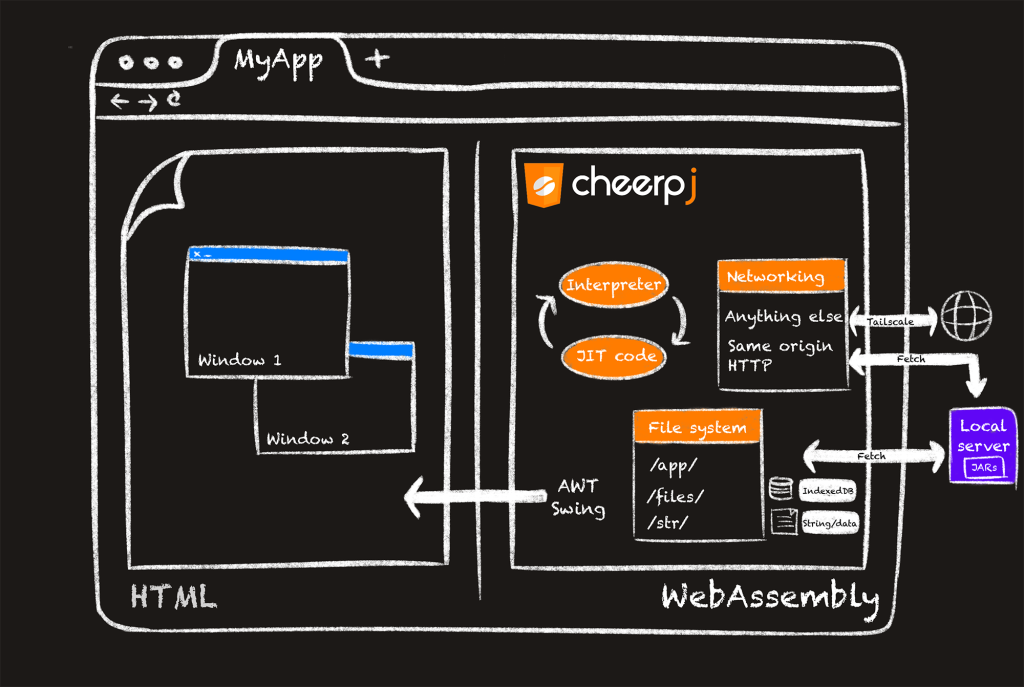
Existing Java applications run unchanged, with CheerpJ providing the Java runtime inside the browser using WebAssembly.

Client results

Fortune 500 HR Software Company turns to CheerpJ for Modernisation of Flagship Product

By using CheerpJ, the Client drastically reduced their development timeline and effort for a new release, eliminating the risk of duplicating bugs and re-implementing complex features. By preserving most of their Java code base, they were also able to make the most of their existing developer skills.

Read the full case study

Request a demo

Discover how to modernize and improve access to your legacy Java applications with CheerpJ.

Schedule a free demo with our team to learn how CheerpJ can help address your Java requirements.

Fill in the form or book a demo directly here

    Leaning Technologies needs the contact information you provide to contact you about our products and services. You may unsubscribe from these communications at any time. For information on how to unsubscribe, as well as our privacy practices and commitment to protecting your privacy, check out our Privacy Policy.